
What is Xero used for? Xero is cloud-based accounting software that helps businesses manage invoicing, expenses, bank transactions, bills, payroll-related workflows, financial reporting, and other everyday accounting tasks from one platform.
For a small-business owner, accounting can quickly become one of those jobs that keeps getting pushed to tomorrow. Invoices need to go out, expenses need to be recorded, bills need to be paid, and financial reports need to be checked. Xero is designed to bring many of these tasks together so business owners and their accountants can spend less time wrestling with spreadsheets.
In this Xero review 2026, we’ll look at what Xero is used for, how it works, its key features, pricing considerations, advantages and limitations, and whether it could make sense for your business.
What Is Xero?
Xero is an online accounting platform designed primarily for small and growing businesses. Because it operates in the cloud, financial information can be accessed through supported devices without relying on traditional desktop accounting software.
Xero provides tools for managing transactions, invoicing customers, recording expenses, reconciling bank accounts, paying bills, and generating financial reports. It can also connect with banks and a range of third-party business applications.
One of Xero’s central ideas is to make accounting more connected. Instead of manually transferring information between spreadsheets and separate systems, businesses can automate or streamline parts of their financial workflow.
This can be particularly useful for businesses that want their owners, bookkeepers, and accountants to work with the same up-to-date financial information.

What Is Xero Used For?
Xero is used for a wide range of everyday accounting and financial management activities.
Invoicing Customers
Businesses can create and send professional invoices, monitor outstanding payments, and keep track of customer transactions.
For freelancers, consultants, agencies, contractors, and other service businesses, having an organized invoicing system can make the process of getting paid much easier.
Tracking Expenses
Xero allows businesses to record and organize expenses. Keeping expenses in one accounting system can make it easier to understand business spending and maintain accurate financial records.
Bank Reconciliation
Xero can connect with supported bank accounts and help businesses match transactions with accounting records. This reduces some of the manual work involved in keeping books up to date.
Managing Bills
Businesses can use Xero to keep track of bills they owe and manage accounts payable.
Financial Reporting
Xero provides financial reports that can help business owners understand revenue, expenses, cash flow, profitability, and other aspects of business performance.
Managing Cash Flow
By bringing income, expenses, invoices, bills, and bank transactions together, Xero can provide a clearer picture of money moving through a business.
How Does Xero Work?
Xero works through an online account where your financial information and accounting activities are managed.
After creating an account, you can configure your organization, connect eligible bank accounts, add customers and suppliers, and begin recording financial transactions.
A typical Xero workflow may look like this:
Set up your business → Connect accounts → Add contacts → Send invoices → Record expenses and bills → Reconcile transactions → Review reports
Once bank feeds and other automated functions are configured, some accounting tasks can happen with considerably less manual data entry.
For example, when a bank transaction appears in Xero, you may be able to match it against an existing invoice, bill, or accounting entry. You can then review the transaction before finalizing the reconciliation.
The exact workflow depends on your business, country, Xero plan, and connected applications.
Key Xero Features in 2026
Xero offers a broad collection of accounting features. The exact availability can vary depending on the market and subscription plan.
Invoicing
Create, customize, and send invoices while keeping track of outstanding amounts.
Bank Feeds and Reconciliation
Connect supported financial accounts and reconcile transactions to keep accounting records current.
Expense Management
Record business expenses and organize supporting financial information.
Bills and Accounts Payable
Track supplier bills and manage amounts your business needs to pay.
Financial Reporting
Generate reports that provide insight into revenue, expenses, cash flow, and financial position.
Inventory Management
Depending on the plan and market, Xero provides inventory-related functionality for businesses that need to monitor products and stock.
Project and Time Tracking
Xero provides tools for businesses that need to track project-related financial information and billable work.
App Integrations
Xero can connect with numerous third-party applications, allowing businesses to build a wider technology ecosystem around their accounting system.
This integration capability is particularly useful when a business already relies on separate platforms for payments, payroll, inventory, customer management, or other operational tasks.

What Are the Benefits of Using Xero?
The biggest attraction of Xero is the opportunity to simplify financial administration.
1. Cloud-Based Access
Because Xero is cloud-based, authorized users can access accounting information from supported devices and locations.
2. Less Manual Data Entry
Bank feeds, automation, and integrations can reduce repetitive bookkeeping work.
3. Better Financial Visibility
Having invoices, expenses, bills, and transactions in one place can make it easier to monitor the financial side of your business.
4. Easier Collaboration
Business owners can work with accountants and bookkeepers without constantly exchanging updated spreadsheet files.
5. Professional Invoicing
A structured invoicing system can help businesses maintain a more consistent billing process.
6. Scalable Accounting
As a business grows, having accounting infrastructure already in place can make financial administration easier to manage.
Who Is Xero Best For?
Xero is primarily aimed at small and growing businesses, but its usefulness depends on the complexity of your accounting requirements.
It can be a good fit for:
- Freelancers
- Consultants
- Contractors
- Online businesses
- Retail businesses
- Professional service companies
- Growing startups
- Small businesses working with accountants or bookkeepers
A freelancer, for example, might use Xero to invoice clients, record expenses, reconcile bank transactions, and review financial reports.
A growing company may use it as a shared accounting platform between its finance team and external accountant.
Businesses with highly specialized or complex accounting requirements should compare Xero with alternatives and confirm that the required features are available in their country and plan.
Xero Pricing and Plans in 2026
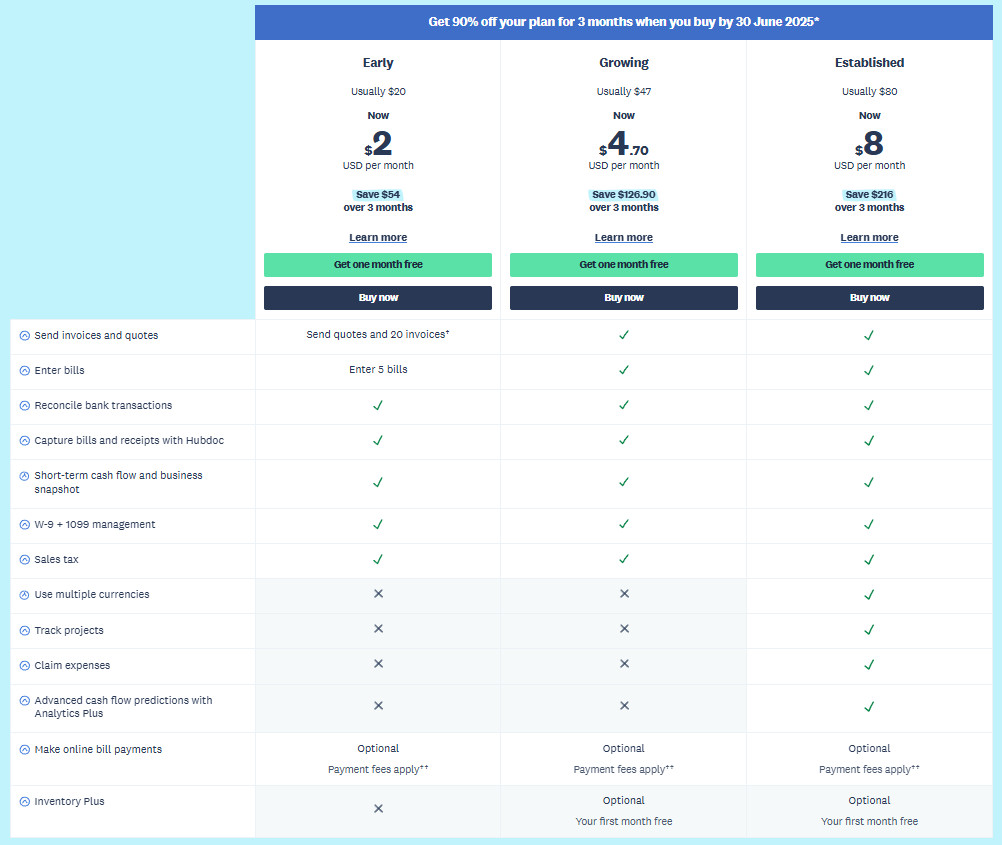
Xero uses subscription-based pricing, with plans and prices varying by country and market.
This is important because there isn’t necessarily one universal Xero price that applies to every customer worldwide. Features, taxes, promotions, payroll availability, and plan names can also differ by region.
Xero typically structures its plans around the needs of different business sizes and accounting requirements, with higher tiers providing additional functionality or greater capacity.
When evaluating Xero pricing in 2026, look beyond the monthly subscription figure. Consider:
- Number of invoices you send
- Number of bills you manage
- Bank reconciliation requirements
- Number of users
- Payroll requirements
- Project or expense-tracking needs
- Third-party integrations
- Payment processing costs
- Regional taxes and pricing
Because Xero can change prices and plan structures, check the official Xero pricing page for the latest pricing available in your country before subscribing.
Xero Pros and Cons
No accounting platform is perfect for every business. Here are some factors worth considering.
Xero Pros
- Cloud-based accounting
- Strong invoicing functionality
- Bank feeds and reconciliation
- Financial reporting tools
- Large integration ecosystem
- Useful collaboration features
- Suitable for many small businesses
- Can reduce repetitive bookkeeping tasks
Xero Cons
- Pricing varies by region and plan
- Some features may require higher-tier subscriptions
- Additional services can increase the overall cost
- New users may need time to understand accounting workflows
- Certain features vary by country
The right choice depends on which features your business actually needs. A lower-priced plan isn’t necessarily better if it lacks an important feature, while paying for advanced functionality you never use may not make financial sense.
Is Xero Good for Small Businesses?
Xero is designed with small and growing businesses in mind, making it a relevant option for companies that want cloud-based accounting without building their financial processes entirely around spreadsheets.
Its combination of invoicing, bank reconciliation, expenses, bills, reporting, and integrations can cover many of the accounting tasks a small business handles every week.
That said, “good” depends on your specific requirements. A very small business with only a handful of monthly transactions may need a simpler solution, while a growing business may value Xero’s broader accounting ecosystem.
Before subscribing, identify the accounting tasks you need to perform regularly and check whether your chosen Xero plan supports them.
How to Get Started With Xero Review 2026
Getting started with Xero doesn’t have to be complicated. The key is setting up your account properly from the beginning.
Step 1: Create Your Xero Account
Visit the official Xero website and select the relevant signup option. Follow the registration process and provide the requested business details.
Step 2: Set Up Your Organization
Enter your business information, accounting preferences, financial settings, and other required details.
Step 3: Connect Your Bank Accounts
Where supported, connect your business bank accounts so transactions can flow into Xero for easier reconciliation.
Step 4: Add Customers and Suppliers
Import or create contacts for customers, suppliers, and other parties you regularly transact with.
Step 5: Create Your First Invoice
Set up your services or products and send your first professional invoice through Xero.
Step 6: Start Reconciling and Reporting
Review imported transactions, reconcile your accounts, record expenses, and explore the available financial reports.
Ready to try Xero? Sign up for Xero here.
Taking the time to configure your account correctly at the beginning can save you unnecessary cleanup later and help you get more value from the platform.

Frequently Asked Questions About Xero
What is Xero mainly used for?
Xero is mainly used for business accounting tasks such as invoicing, expense tracking, bank reconciliation, bill management, financial reporting, and other bookkeeping activities.
Is Xero suitable for small businesses?
Yes. Xero is designed to support small and growing businesses, although the best plan depends on the size and accounting requirements of the business.
Is Xero easy to use?
Xero is designed to make accounting more accessible, but users who are unfamiliar with bookkeeping may still need some time to learn the platform and basic accounting concepts.
Can Xero create invoices?
Yes. Invoicing is one of Xero’s core accounting functions, allowing businesses to create and send invoices and track outstanding amounts.
Can Xero connect to a bank account?
Xero supports bank feeds for eligible financial institutions and accounts. Availability and setup can vary by country and bank.
Does Xero replace an accountant?
Not necessarily. Xero can automate and simplify many bookkeeping tasks, but an accountant or qualified financial professional may still be valuable for tax planning, complex accounting matters, compliance, and financial advice.
Is Xero free?
Xero is primarily a paid accounting service, although promotional trials or offers may be available depending on the market and time of signup.
Is Xero Worth Considering in 2026?
If you’re looking for cloud-based accounting software that combines invoicing, expenses, bank reconciliation, bills, reporting, and integrations in one platform, Xero is worth putting on your comparison list.
Its strongest appeal is the way different accounting tasks can work together instead of being managed through disconnected spreadsheets and applications.
However, the right accounting software depends on your business size, budget, country, accounting needs, and preferred workflow. Xero’s pricing and available features can also vary by market, so checking the current plan details before subscribing is important.
For a small business that wants to move beyond manual bookkeeping and build a more organized financial workflow, Xero provides a comprehensive set of tools to explore.
If your goal is to spend less time managing accounting administration and more time running your business, exploring Xero’s current plans and features could be a practical next step.
Leave a Reply