

What is FreshBooks used for? FreshBooks is an online accounting and invoicing software designed to help small businesses, freelancers, consultants, and service-based professionals manage invoices, expenses, payments, time tracking, projects, and other essential financial tasks from one place.
Running a business involves much more than delivering great products or services. You also need to keep track of what you earn, what you spend, who owes you money, and how your business is performing. That is where accounting software like FreshBooks can make a significant difference.
In this guide, we’ll explain what FreshBooks is used for, its key features and benefits, how it works, pricing considerations, and how to get started in 2026.
What Is FreshBooks?
FreshBooks is a cloud-based accounting and financial management platform built primarily for small businesses and self-employed professionals. Instead of managing invoices, expenses, payments, and financial records manually, users can handle many of these tasks through a centralized online dashboard.
Because FreshBooks is cloud-based, you can access your account from supported devices without relying on a traditional desktop accounting installation. This makes it particularly useful for business owners who work remotely, travel frequently, or need access to their financial information outside the office.
FreshBooks is also designed with usability in mind. You don’t necessarily need advanced accounting knowledge to create an invoice, record an expense, or check your business finances.

1. What Is FreshBooks Used For?
FreshBooks is used for several everyday business and accounting tasks. Its primary purpose is to simplify financial administration so business owners can spend less time on paperwork and more time running their businesses.
Here are some of the most common ways businesses use FreshBooks:
Creating and Sending Invoices
FreshBooks allows businesses to create professional invoices and send them to customers electronically. You can customize invoices with business information, descriptions, payment terms, and other relevant details.
This can make your billing process more organized and reduce the need to create invoices manually.
Tracking Business Expenses
You can record business expenses and organize financial information in one place. Keeping expenses properly documented can make it easier to understand where your money is going and prepare information for accounting and tax purposes.
Accepting Payments
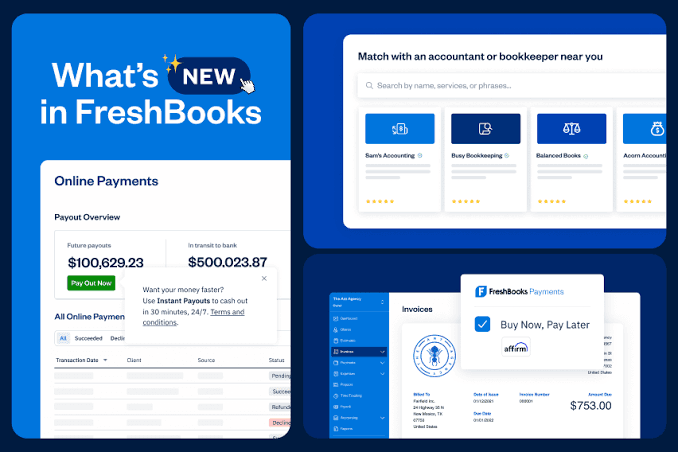
FreshBooks supports online payment functionality, allowing customers to pay certain invoices electronically. Faster and more convenient payment options can help businesses streamline their accounts receivable process.
Tracking Time and Projects
For consultants, freelancers, agencies, and other service providers, FreshBooks can be used to track billable hours and connect time with projects or clients.
Managing Clients
FreshBooks also provides tools for organizing client information and managing financial interactions with customers.
2. Key FreshBooks Features
FreshBooks combines several financial and business management tools within one platform. Depending on the plan you choose, available functionality can include:
- Professional invoicing
- Online payments
- Expense tracking
- Time tracking
- Estimates and proposals
- Recurring invoices
- Client management
- Financial reports
- Project management
- Accounting tools
- Automated payment reminders
- Receipt and expense organization
- Team collaboration features
One of the platform’s biggest advantages is that these functions are connected. For example, a service provider can track time for a client, add billable hours to an invoice, send the invoice, and monitor payment from the same ecosystem.
That type of workflow can reduce repetitive administrative work.
3. Who Is FreshBooks Best For?
FreshBooks is particularly suited to freelancers, consultants, entrepreneurs, agencies, contractors, and small service-based businesses.
It can be useful if your business regularly sends invoices, tracks expenses, bills clients by the hour, or needs straightforward financial reporting.
For example, a freelance designer could use FreshBooks to track project hours, send an invoice to a client, record software expenses, and monitor whether the invoice has been paid.
A consulting business could similarly use it to manage clients, track billable time, create estimates, and keep financial information organized.
Businesses with more complex accounting requirements may need to compare FreshBooks with other accounting platforms before deciding whether it meets their needs.
4. How Does FreshBooks Work?
FreshBooks works through a cloud-based account. After creating an account, you can enter your business details and begin setting up clients, services, invoices, expenses, and other financial information.
A typical workflow might look like this:
Set up your business → Add clients → Create products or services → Create invoices → Accept payments → Track expenses → Review reports
The exact workflow will depend on your business model and the FreshBooks features available under your subscription.
The platform is designed to keep routine financial tasks connected, which can make it easier to understand your business activity without maintaining multiple disconnected spreadsheets.
5. Benefits of Using FreshBooks for a Small Business
Choosing accounting software is about more than having a list of features. The real question is whether the software makes running your business easier.
Saves Time
Automating repetitive tasks such as invoicing and payment reminders can reduce the amount of time you spend on administration.
Improves Organization
Instead of keeping financial information across spreadsheets, emails, paper receipts, and separate applications, FreshBooks gives you a central place to manage many accounting-related tasks.
Makes Invoicing More Professional
Professional invoices can create a more consistent customer experience and make your business look more organized.
Helps You Monitor Cash Flow
Keeping track of invoices, payments, and expenses can give you a clearer picture of your business’s financial activity.
Supports Remote Work
Since FreshBooks is cloud-based, business owners can manage financial tasks from locations outside the traditional office.
Simplifies Financial Management
For small-business owners who don’t want to spend their entire day dealing with accounting administration, having multiple tools connected in one platform can be valuable.
6. Is FreshBooks an Accounting Software?
Yes. FreshBooks is accounting software, although it is particularly known for combining accounting functionality with invoicing, billing, time tracking, expense management, and client-focused business tools.
It is designed with small businesses and self-employed professionals in mind rather than organizations that require highly complex enterprise accounting systems.
If your main requirements involve invoicing clients, tracking expenses, managing payments, monitoring business finances, and producing useful financial reports, FreshBooks may provide the functionality you need.
However, it’s important to review the features included in the specific plan you are considering because capabilities can vary between subscription tiers.
7. How Much Does FreshBooks Cost?
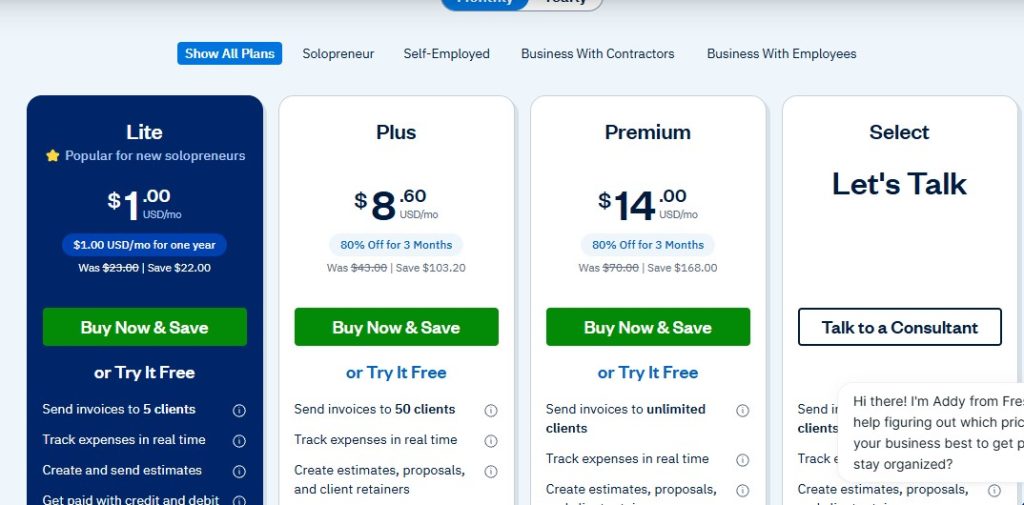
FreshBooks uses a subscription-based pricing model, with pricing and available features varying by plan and business requirements.
FreshBooks periodically changes its pricing, promotions, included features, and plan structures. Therefore, rather than relying on an outdated price listed in an article, check the current official FreshBooks pricing page before subscribing.
The cost you pay may depend on factors such as:
- Your selected subscription plan
- Number of clients or users
- Additional team members
- Payment processing services
- Optional features or add-ons
- Promotional offers available when you subscribe
For businesses comparing accounting software, don’t look at the monthly subscription price alone. Consider the features included, payment costs, number of users, client limits, and the amount of administrative time the software could save.
8. How to Get Started With FreshBooks
Getting started with FreshBooks is relatively straightforward.
Step 1: Create Your Account
Visit the official FreshBooks website and select the option to sign up. Follow the registration process and provide the requested business information.
Step 2: Set Up Your Business
Add your business name, contact information, currency, and other relevant details. Taking a few minutes to configure your account properly can make future invoicing and reporting easier.
Step 3: Add Your Clients
Enter the clients you regularly work with. You can then associate invoices, projects, and other relevant activities with the appropriate customer.
Step 4: Create Your First Invoice
Add your services or products, set your prices, include payment terms, and send the invoice to your customer.
Step 5: Connect Your Financial Workflow
Begin recording expenses, tracking payments, monitoring invoices, and using the reporting tools available with your plan.
Ready to Try FreshBooks?
If you’re looking for a simpler way to manage invoicing, expenses, payments, and other small-business accounting tasks, you can sign up for FreshBooks here and explore the platform for yourself.
9. Frequently Asked Questions About FreshBooks
What is FreshBooks mainly used for?
FreshBooks is mainly used for invoicing, expense tracking, payments, time tracking, client management, project management, and small-business accounting.
Is FreshBooks good for small businesses?
FreshBooks is designed with small businesses, freelancers, consultants, and service-based professionals in mind. Whether it is suitable for your business depends on your accounting requirements, budget, and the features you need.
Can FreshBooks track expenses?
Yes. FreshBooks provides expense-tracking functionality that helps users organize and monitor business expenses.
Can I send invoices through FreshBooks?
Yes. Creating and sending invoices is one of FreshBooks’ core functions. Users can create professional invoices and manage their billing workflow from the platform.
Does FreshBooks accept online payments?
FreshBooks supports online payment options, although available payment methods, fees, and functionality can depend on the services and plan you use.
Is FreshBooks easy to use?
FreshBooks is built to make financial administration accessible to small-business owners and professionals. However, the learning experience can vary depending on your accounting knowledge and the complexity of your business.
Is FreshBooks free?
FreshBooks is primarily a paid subscription service, although it may offer trials or promotional opportunities from time to time. Always check the official website for current offers and pricing.

10. Is FreshBooks Right for Your Business?
FreshBooks can be a practical option if your business needs an easier way to handle invoicing, expenses, payments, time tracking, clients, and everyday accounting tasks.
It can be especially useful for freelancers and service-based businesses where billing clients and tracking billable work are important parts of daily operations.
However, the right accounting platform ultimately depends on your business size, accounting complexity, budget, number of users, and the specific features you require.
Before subscribing, compare the current FreshBooks plans and make sure the features you actually need are included.
If you’re tired of juggling invoices, expenses, spreadsheets, and payment records across different tools, FreshBooks may be worth exploring. A more organized financial workflow can give you more time to focus on the work that actually grows your business. Click here and start your free trial now!!!
Leave a Reply