
What is Brevo used for? Brevo is an all-in-one marketing and CRM platform that helps businesses communicate with customers through email, SMS, WhatsApp, chat, and other channels while managing contacts, sales activities, and marketing automation from one platform.
For many businesses, the challenge isn’t finding customers—it’s staying in touch with them consistently. You need to welcome new subscribers, follow up with leads, send promotions, recover abandoned carts, answer customer questions, and keep your sales pipeline organized.
That is where Brevo comes in.
Rather than using one tool for email marketing, another for customer relationship management, and another for automated communication, Brevo brings several of these functions together. But is it actually useful for a small business, and is the free plan enough to get started?
Let’s take a closer look at what Brevo does, how it works, what it costs, and whether it deserves a place in your marketing toolkit in 2026.
What Is Brevo?
Brevo is a marketing and CRM platform designed to help businesses build and manage customer relationships across multiple communication channels.
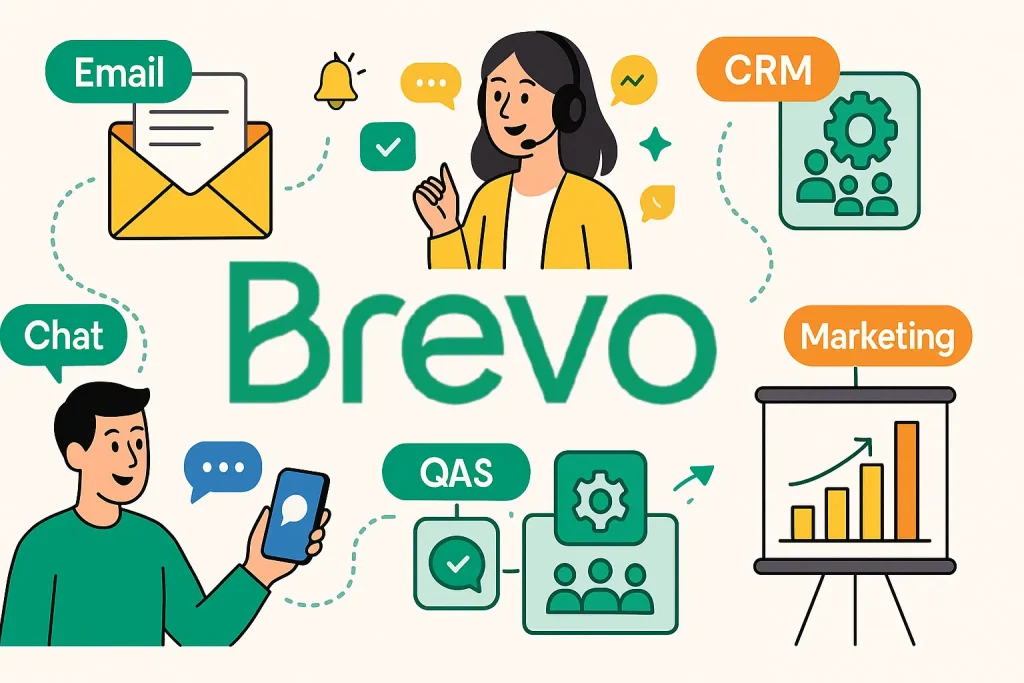
Its platform includes email marketing, marketing automation, contact management, sales tools, transactional messaging, conversations, SMS, WhatsApp, and other customer communication features.
At its simplest, you can use Brevo to collect contacts, organize them into segments, create marketing campaigns, send messages, and measure how people respond.
But it goes beyond traditional email newsletters.
For example, a business could use Brevo to collect leads through a signup form, automatically send a welcome email, move qualified leads into a sales pipeline, send an abandoned-cart reminder, and track customer interactions—all within the same broader platform.
What Is Brevo Mainly Used For?
Brevo is mainly used for email marketing, customer relationship management, marketing automation, transactional messaging, and multi-channel customer communication.
Businesses commonly use it to:
- Send newsletters and promotional emails
- Build and manage email contact lists
- Segment customers and leads
- Automate marketing campaigns
- Send welcome and follow-up emails
- Recover abandoned shopping carts
- Send transactional emails
- Communicate through SMS and WhatsApp
- Manage sales pipelines
- Track customer interactions
- Create signup forms
- Engage website visitors through chat
- Analyze campaign performance
For example, an online store could use Brevo to send a welcome email when someone joins its mailing list, recommend products based on customer activity, and automatically remind customers about abandoned carts.
A service business might instead use it to capture leads, schedule follow-ups, manage deals, and keep customer communication organized.
The real value is not simply sending emails. It’s connecting communication with customer data and automation so that your business can respond more consistently.
Is Brevo an Email Marketing Platform?
Yes. Brevo is an email marketing platform, and email marketing remains one of its core capabilities.
You can design campaigns using a drag-and-drop editor, use templates, segment contacts, personalize messages, and monitor campaign performance.
Brevo also supports marketing automation, allowing businesses to create workflows that send messages based on customer actions or predefined conditions. Its email marketing tools include segmentation, signup forms, automation, and campaign analytics.
One useful distinction is that Brevo supports both marketing and transactional email.
Marketing emails can include newsletters, promotions, sales announcements, and other campaigns. Transactional messages include things such as order confirmations and password-reset emails.
That makes Brevo more versatile than a platform focused exclusively on newsletters.
Is Brevo a CRM?
Yes. Brevo includes CRM functionality.
Its CRM tools allow businesses to manage contacts, companies, deals, tasks, segments, and sales activities.
This means you can use Brevo for more than marketing.
You can keep customer information organized, track prospects through sales stages, assign tasks, and connect customer data with your marketing campaigns.
This is particularly useful for small businesses that don’t want to pay for separate email marketing and CRM platforms.
Instead of having your sales team work in one application while your marketing contacts live somewhere else, Brevo gives you the option to connect those activities.
How Does Brevo Work?
Brevo works by bringing your customer data, communication channels, and automation workflows into one platform.
The process generally starts with your contacts.
You can add contacts manually, import them from a file, or synchronize them through integrations. Brevo then allows you to organize contacts using attributes and segments.
From there, you can create campaigns or automated workflows.
A basic workflow might look like this:
Visitor signs up → Contact enters your database → Welcome email is sent → Contact interacts with your content → Contact is segmented → Follow-up message is sent
You can also connect Brevo to websites and ecommerce platforms. Its integrations include popular platforms such as Shopify, WooCommerce, and PrestaShop.
For transactional emails, developers can use Brevo’s API or SMTP services to automatically send messages triggered by actions on a website or application.
This flexibility makes Brevo useful for both marketers who prefer no-code tools and businesses that need deeper technical integrations.
Is Brevo Good for Small Businesses?
Brevo can be a strong option for small businesses, particularly those that want email marketing, CRM, and automation without paying for several separate platforms.
A small online store could use Brevo for newsletters, promotional campaigns, abandoned-cart emails, and customer segmentation.
A consultant or agency could use it to capture leads, organize contacts, manage deals, and automate follow-up messages.
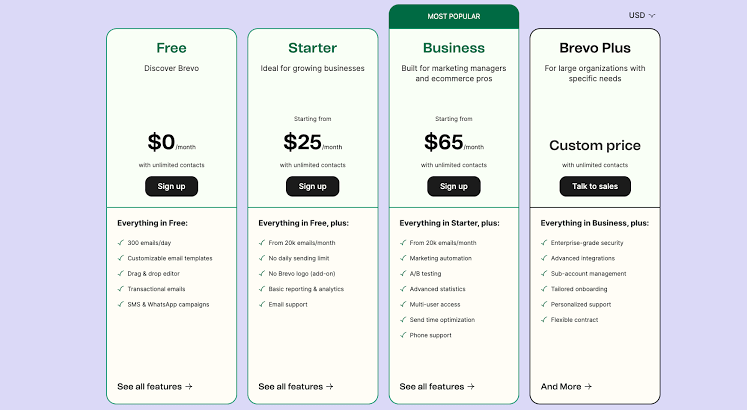
Another advantage is that Brevo offers a free plan, allowing businesses to start without committing to a paid subscription. The free marketing plan currently allows up to 300 emails per day and does not require a credit card to sign up.
Of course, small businesses should still compare features and pricing before committing. If your needs are extremely basic, a simpler email service might be enough. If you’re trying to connect marketing and sales, however, Brevo becomes more interesting.
How Much Does Brevo Cost?
Brevo uses a tiered pricing structure, and the amount you pay depends on the product and level of usage.
Its current marketing platform includes a Free plan, while paid options include Starter, Standard, Professional, and Enterprise tiers. Brevo’s official pages currently show Starter pricing beginning at $9 per month, with annual billing offering a lower effective monthly rate in the displayed pricing.
The Starter plan includes features such as email and transactional messaging, a drag-and-drop editor, templates, AI content tools, and advanced segmentation.
Brevo also prices some services separately. For example, SMS and WhatsApp messaging can depend on message volume and destination, while additional sales functionality may be available as a separate package.
Because Brevo can change pricing, features, and limits, check the official pricing page before purchasing.
The important thing is to compare what you actually need rather than choosing a plan simply because it has the lowest monthly price.
Does Brevo Have a Free Plan?
Yes. Brevo has a free plan.
The current Free marketing plan allows businesses to send up to 300 emails per day, and Brevo says there is no credit card required to create the account.
The free option can be useful if you’re starting an email list, testing the platform, or running a small marketing operation.
However, free plans naturally come with limitations. Businesses with larger sending volumes or more advanced requirements may eventually need a paid plan.
The good news is that you can start small and upgrade when your marketing needs grow.
Can Brevo Automate Email Marketing?
Yes. Email marketing automation is one of Brevo’s major features.
Brevo allows you to build workflows based on triggers, rules, and actions. A trigger might be a person joining a list, visiting a page, opening an email, making a purchase, or performing another supported action.
You can then tell Brevo what should happen next.
For example:
New subscriber → Wait 1 day → Send welcome email → Wait 3 days → Send useful content → Check engagement → Send appropriate follow-up
Brevo also provides ready-made automation scenarios for use cases such as welcome emails, abandoned carts, birthdays, and onboarding.
Once activated, the workflow can run automatically whenever contacts meet the conditions you’ve established.
That can save a surprising amount of time, especially when you’re dealing with hundreds or thousands of contacts.
Key Brevo Features and Benefits
Beyond the features already discussed, Brevo provides several tools that can make it a practical all-in-one marketing platform.
Contact Segmentation
You can organize contacts based on attributes, behavior, engagement, and other criteria, allowing you to send more relevant messages.
Multi-Channel Marketing
Brevo supports email, SMS, WhatsApp, and other communication channels, giving businesses more ways to reach customers.
Transactional Messaging
Businesses can send automated messages such as order confirmations, shipping notifications, and password resets through Brevo’s transactional tools.
Sales Management
Brevo includes sales functionality for managing deals, pipelines, tasks, and customer relationships.
Website Tracking
The Brevo Tracker can monitor website activity and use visitor actions to support segmentation and automation.
Integrations
Brevo can connect with ecommerce platforms and other business applications, helping businesses synchronize customer information across their technology stack.
How to Get Started With Brevo
Getting started with Brevo is relatively straightforward, especially if you’re new to email marketing.
Step 1: Create Your Account
Start by creating your free Brevo account. Sign up for Brevo here. Brevo currently states that you can start on the Free plan without a credit card.
Step 2: Add Your Contacts
Import your existing subscribers or begin collecting new contacts through signup forms. Make sure your contact collection practices comply with applicable email marketing and privacy requirements.
Step 3: Create Your First Campaign
Use the email editor and templates to create a newsletter, promotional campaign, or other message.
Step 4: Build an Automation
Start with something simple, such as a welcome email for new subscribers. Once you’re comfortable, you can create more advanced workflows.
Step 5: Connect Your Website
If you operate an online store or business website, connect it to Brevo using an available integration or tracking tools.
Step 6: Review Your Results
Monitor opens, clicks, unsubscribes, conversions, and other available metrics. Use those insights to improve future campaigns.
Frequently Asked Questions About Brevo
What is Brevo mainly used for?
Brevo is mainly used for email marketing, marketing automation, CRM, transactional messaging, SMS, WhatsApp communication, and sales management.
Is Brevo an email marketing platform?
Yes. Email marketing is one of Brevo’s core services, with tools for campaigns, segmentation, templates, signup forms, analytics, and automation.
Is Brevo a CRM?
Yes. Brevo includes CRM features for managing contacts, companies, deals, tasks, and sales pipelines.
Is Brevo good for small businesses?
Yes. Brevo can be particularly useful for small businesses that want email marketing and CRM capabilities in one platform. Its free plan also provides an inexpensive way to get started.
How much does Brevo cost?
Brevo offers a Free plan, while paid marketing plans currently start at $9 per month for Starter when billed monthly. Pricing varies according to the product, usage, and billing option.
Does Brevo have a free plan?
Yes. Brevo’s Free plan currently supports up to 300 emails per day and does not require a credit card to sign up.
Can Brevo automate email marketing?
Yes. Brevo allows users to create automated workflows triggered by subscriber actions, contact changes, website behavior, and other events.
Is Brevo Worth Considering in 2026?
Brevo is worth considering if you’re looking for a platform that combines email marketing, CRM, automation, and multi-channel communication without forcing you to manage several separate tools.
Its free plan makes it easy to test the platform, while paid plans provide additional capacity and functionality as your business grows. Its automation capabilities are particularly useful for businesses that want to stop sending every follow-up email manually.
It isn’t necessarily the perfect choice for everyone. Large organizations with highly specialized requirements may need a more enterprise-focused platform, while businesses that only send occasional emails may not need Brevo’s broader feature set.
For small businesses, ecommerce brands, freelancers, agencies, and growing companies, however, Brevo offers a compelling combination of affordability and functionality.
If you’re serious about building an email list, nurturing leads, and turning customer communication into a repeatable system, Brevo is a platform worth putting on your shortlist in 2026.
Leave a Reply