
QuickBooks review searches are increasingly common among business owners looking for a reliable way to manage accounting, invoicing, expenses, payments, and financial records without spending all day working with spreadsheets. QuickBooks is one of the best-known accounting platforms for small businesses, but is it actually worth paying for in 2026?
For many businesses, the answer is yes. QuickBooks brings several essential financial tasks into one platform, helping business owners understand their cash flow, keep records organised, create invoices, track expenses, connect bank accounts, and generate financial reports. However, the right plan depends on the size and needs of your business.
In this QuickBooks review, we examine what QuickBooks is used for, its main features and benefits, pricing in 2026, invoicing and banking capabilities, and whether it is a worthwhile investment for a small business.
What Is QuickBooks Review?
QuickBooks is accounting and financial management software developed by Intuit. It is designed to help businesses manage their finances, including income, expenses, invoices, bills, payments, banking transactions, and financial reporting.
QuickBooks Online is the cloud-based version, allowing users to access their financial information through the internet rather than relying solely on software installed on a computer.
One of its biggest advantages is that it brings everyday bookkeeping activities together in one place. Instead of maintaining separate spreadsheets for income, expenses, invoices, and bank transactions, a business can manage many of these tasks from a single dashboard.
QuickBooks has also continued to add automation and AI-powered capabilities. In 2026, Intuit introduced improvements designed to automate routine bookkeeping tasks, improve reporting, and help users work more efficiently.

What Is QuickBooks Mainly Used For?
QuickBooks is mainly used for managing the financial side of a business. Its tools are particularly useful for small businesses, freelancers, contractors, and growing companies that want more control over their finances.
Some of its most common uses include:
- Tracking business income and expenses
- Creating and sending invoices
- Recording and managing bills
- Connecting bank and credit card accounts
- Reconciling financial transactions
- Tracking sales and payments
- Managing certain inventory needs
- Preparing financial reports
- Monitoring cash flow
- Organising business financial records
The real value comes from having these functions connected. For example, when a business connects an eligible bank account, transactions can automatically flow into QuickBooks, where they can be reviewed, categorised, and matched with existing records.
This can significantly reduce repetitive data entry and make it easier to maintain accurate financial records.
Is QuickBooks an Accounting Software?
Yes. QuickBooks is accounting software, although it offers considerably more than basic bookkeeping.
Depending on the plan and market, QuickBooks can support activities such as income and expense tracking, invoicing, bill management, bank feeds, financial reporting, inventory tracking, budgeting, and other business finance workflows.
The advantage is that business owners do not necessarily need to be accounting experts to perform many routine tasks. QuickBooks provides structured forms, dashboards, reports, and automated processes that make financial management more approachable.
That said, QuickBooks should not be viewed as a replacement for professional accounting advice in situations involving complex taxes, unusual transactions, or major financial decisions. It is a tool for managing financial information, while an accountant can help interpret that information and provide professional advice.
Is QuickBooks Good for Small Businesses?
For many small businesses, QuickBooks is a strong accounting option.
Small business owners often need to do more with fewer resources. Hiring a full-time accountant may not make financial sense when the business is still growing, while managing everything manually can quickly become stressful and error-prone.
QuickBooks helps bridge that gap.
A business owner can use it to track money coming in and going out, create invoices, monitor outstanding payments, connect banking information, and generate reports that provide a clearer picture of business performance.
QuickBooks also offers different plans, allowing businesses to choose features based on their requirements. For example, more advanced plans can add capabilities such as inventory management, budgeting, additional users, custom reporting, and workflow automation.
The main consideration is cost. A very small business with only a handful of monthly transactions may find a simpler accounting solution sufficient. But as transactions, customers, expenses, and reporting requirements increase, QuickBooks can become much more valuable.
How Much Does QuickBooks Cost in 2026?
QuickBooks pricing in 2026 depends on the country, plan, promotions, and whether you are a new or existing subscriber. This is important because advertised introductory prices can be significantly lower than standard renewal prices.
For example, QuickBooks’ current Nigeria-facing pricing page lists plans including Simple Start, Essentials, Plus, and Advanced. At the time of writing, the displayed standard monthly prices are approximately US$21, US$31, US$46, and US$89, respectively, although promotional pricing may temporarily reduce those amounts.
QuickBooks has also confirmed that some subscription prices changed for renewals beginning August 1, 2026, while prices for QuickBooks Free, Lite, Ledger, and Simple Start remained unchanged under that particular update.
Because pricing can change and differs by market, it is best to check the official pricing page before subscribing.
The key point is not simply choosing the cheapest plan. Instead, consider the features your business actually needs. Paying for advanced functionality that you never use can unnecessarily increase your accounting costs. 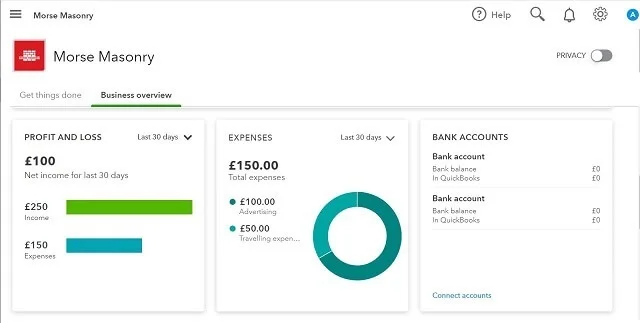
Can QuickBooks Create and Send Invoices?
Yes. QuickBooks can create and send invoices to customers.
Users can create an invoice, add a customer, enter products or services, apply relevant payment settings, and send the invoice electronically. QuickBooks also allows invoices to be downloaded, printed, or shared through available options.
This is particularly useful for freelancers and service businesses that regularly bill clients.
Rather than creating invoices manually in a word processor or spreadsheet, businesses can maintain customer information and invoicing records inside the same financial system they use for bookkeeping.
Depending on the plan and available services, businesses can also provide customers with online payment options, making the invoicing process more connected from billing through payment.
Can QuickBooks Connect to a Bank Account?
Yes. QuickBooks Online can connect to eligible bank and credit card accounts.
Once connected, recent transactions can automatically download into QuickBooks. Users can then review, categorise, match, and add those transactions to their books.
This is one of QuickBooks’ most useful features because manually entering every transaction can consume considerable time.
QuickBooks also supports manual transaction uploads when a financial institution is unavailable or when older transactions need to be added. Bank availability can vary by country and financial institution, so businesses should confirm that their bank is supported before relying on automatic feeds.
For a small business processing dozens or hundreds of transactions each month, bank connectivity can make bookkeeping much easier.
Key Benefits of Using QuickBooks
The biggest benefit of QuickBooks is convenience. Instead of using separate tools for different financial tasks, businesses can bring much of their accounting workflow into one platform.
1. Better financial organisation
QuickBooks keeps income, expenses, invoices, bills, and other financial information organised in one system.
2. Less manual bookkeeping
Bank feeds and automation can reduce repetitive data entry and help businesses keep their records updated.
3. Professional invoicing
Businesses can create customised invoices and send them directly to customers, creating a more professional billing process.
4. Useful financial reports
Financial reports can help business owners understand revenue, expenses, profitability, and other important aspects of business performance.
5. Easier collaboration
Depending on the plan, QuickBooks allows additional users and accountants to work with business financial information, making collaboration easier.
6. Growing automation
QuickBooks is increasingly incorporating automation and AI capabilities. In 2026, Intuit highlighted tools designed to automate recurring tasks, assist with invoices, identify issues, and make financial information easier to work with.
How to Get Started With QuickBooks
Getting started with QuickBooks is relatively straightforward.
First, determine which QuickBooks plan matches your business. Think about the number of users you need, whether you require inventory management, whether you need bill management, and how advanced your reporting requirements are.
Next, create your account and configure your business information. You can then connect eligible bank and credit card accounts, customise invoices, add customers and suppliers, and begin recording transactions.
For businesses that already have financial records, it is worth taking some time to organise the data before importing everything. A clean setup can make your QuickBooks account much easier to manage later.
You can sign up for QuickBooks and explore the available plans here.
Once your account is ready, make bookkeeping a regular habit rather than something you only do when tax deadlines approach. Reviewing transactions regularly will give you a much clearer picture of how your business is performing.
Is QuickBooks Worth It for a Small Business?
For many small businesses, QuickBooks is worth considering because it can save time while giving owners greater visibility into their finances.
The strongest case for QuickBooks is when your business has regular sales, multiple expenses, recurring invoices, bank transactions, or a growing need for financial reports. In these situations, the cost of accounting software can be justified by the time saved and the improved organisation it provides.
However, QuickBooks may be more than you need if you operate a very simple business with only a few transactions and minimal accounting requirements.
The best approach is to compare the features you actually need against the monthly subscription cost. If QuickBooks eliminates hours of manual bookkeeping each month and gives you better financial visibility, the investment can quickly become worthwhile.
Frequently Asked Questions About QuickBooks
Is QuickBooks difficult to learn?
QuickBooks is designed to make routine accounting tasks accessible to business owners, although beginners may need some time to understand accounting terminology and set up their books correctly.
Does QuickBooks have a free plan?
QuickBooks offers different products and plans depending on the market. Availability and features can change, so check the official QuickBooks website for the current options in your country.
Can I use QuickBooks without an accountant?
Yes. Many small business owners use QuickBooks themselves. However, professional accounting advice can still be valuable for tax planning, complex transactions, and other financial matters.
Does QuickBooks work online?
Yes. QuickBooks Online is cloud-based, allowing users to access their accounting information through supported devices with an internet connection.
Can QuickBooks track expenses?
Yes. Expense tracking is one of QuickBooks’ core functions, and connected bank transactions can make recording and categorising expenses more efficient.
Final Verdict: Is QuickBooks Worth Considering in 2026?
QuickBooks remains a strong option for small businesses that want an organised way to manage accounting, invoicing, expenses, banking, and financial reporting.
Its biggest strengths are the combination of accounting tools, bank connectivity, invoicing, automation, and reporting in one platform. The addition of newer AI-powered capabilities also shows that QuickBooks is continuing to evolve rather than simply maintaining traditional bookkeeping features.
The main drawback is that subscription costs can add up, particularly as a business moves to a higher-tier plan. That makes choosing the right plan important.
If your business is growing and you want fewer spreadsheets, less manual data entry, and a clearer understanding of where your money is going, QuickBooks is certainly worth considering in 2026. Start with the plan that matches your current needs and upgrade only when your business actually requires additional features.
Leave a Reply