
Gusto used for payroll processing, human resources (HR), employee benefits administration, and workforce management. In 2026, Gusto helps businesses manage employee payments, calculate payroll taxes, onboard new hires, and organize essential HR tasks through one online platform.
Running a business means keeping employees paid accurately and handling administrative responsibilities on time. When payroll calculations, tax documents, employee records, and benefits are managed separately, mistakes can become expensive and time-consuming. Gusto aims to simplify these responsibilities by bringing many of them together in one system.
But is Gusto the right payroll solution for your company? This Gusto review explores its features, pricing, benefits, limitations, and suitability for small businesses so you can decide whether it deserves a place in your business toolkit.
Gusto Review 2026: An Overview
Gusto is a cloud-based payroll and HR platform designed primarily for businesses operating in the United States. It combines payroll processing, payroll tax administration, employee onboarding, benefits management, and other workforce tools.
The platform is particularly attractive to small and medium-sized businesses that want to reduce manual payroll work without building a large internal HR department.
Depending on the selected plan, businesses can also access time tracking, scheduling, hiring tools, employee performance features, and professional HR support.
Gusto’s main advantage is convenience. Instead of calculating employee pay, managing payroll taxes, and organizing employee information across different systems, businesses can handle many of these responsibilities through one account.
However, Gusto is not equally suitable for every business worldwide. Its payroll tax services and employee benefits are primarily designed around the US regulatory environment, so businesses operating exclusively in Nigeria or other countries should confirm local payroll support before subscribing.

Suggested image: A Gusto dashboard displaying payroll information, employee records, and workforce management tools.
What Is Gusto?
Gusto is payroll and human resources software that helps businesses manage employee payments and employment-related administration.
It is designed to make routine tasks easier, including calculating wages, processing payroll, handling payroll tax filings, maintaining employee records, and onboarding new employees.
For example, a small company with ten employees might previously have relied on spreadsheets to calculate salaries, track paid time off, and prepare payroll information. With Gusto, many of these processes can be handled through a connected online system.
Gusto also supports employee benefits administration, including eligible health insurance and retirement-related options. Availability depends on the business’s location, selected services, and applicable eligibility requirements.
The platform is therefore more than a payroll calculator. It helps businesses organize several important parts of the employee management process.
What Does Gusto Do?
Gusto helps employers manage payroll and related HR responsibilities more efficiently.
Its primary uses include:
- Payroll processing: Calculate employee earnings, deductions, and payments.
- Payroll tax administration: Handle eligible federal, state, and local payroll tax filings and payments.
- Employee onboarding: Collect employee information and complete relevant onboarding documents.
- Benefits administration: Manage eligible employee benefits through supported services.
- Time tracking: Record employee hours and connect time information with payroll on supported plans.
- Paid time off management: Organize leave policies and track eligible time off.
- Contractor payments: Pay eligible contractors and manage relevant tax documentation.
- HR support: Access additional HR tools and expert assistance on eligible plans.
Consider a growing company that hires several new employees throughout the year. Rather than managing employee documents, payroll records, and tax information separately, the business can use Gusto to coordinate many of these activities.
The result is less administrative work and a more organized process for paying and managing employees.
Gusto Features
Gusto provides a range of features designed to simplify payroll and employee administration.
1. Automated Payroll
Businesses can calculate employee pay, manage deductions, and process payroll through the platform. Gusto supports unlimited payroll runs on its advertised payroll plans, making it easier to handle regular payroll and additional pay runs when necessary.
2. Payroll Tax Filing
Gusto handles eligible payroll tax filings and payments according to the selected service and supported jurisdictions. This can reduce manual calculations and help businesses manage recurring tax responsibilities.
Employers remain responsible for reviewing their information and addressing any issues that require their attention.
3. Employee Onboarding
New employees can provide required information and complete supported documents online. This helps businesses organize onboarding without relying entirely on paper forms.
4. Benefits Administration
Eligible employers can manage benefits such as health insurance and retirement plans through Gusto’s supported services and integrations. Availability and costs vary by location and provider.
5. Time Tracking and Scheduling
Eligible plans provide time tracking and scheduling capabilities. These tools can help businesses record working hours and connect them with payroll calculations.
6. Employee Self-Service
Employees can access relevant pay information and documents through Gusto’s employee tools, reducing the need to request every record from the employer.
7. HR Tools and Support
Higher-tier plans provide additional HR resources, performance management capabilities, and access to professional guidance. These features can be valuable as a business grows and its employment responsibilities become more complex.
8. Accounting Integrations
Gusto integrates with supported accounting and business applications, helping companies connect payroll information with their broader financial workflows.
The features available depend on the selected subscription and any add-ons purchased. Businesses should compare plans carefully before choosing one. Gusto’s official pricing and feature comparison

Suggested image: A Gusto payroll screen showing employee earnings, payroll calculations, and payment information.
Gusto Pricing and Plans in 2026
Gusto uses a subscription-based pricing model. Its advertised prices vary by plan, employee or contractor count, and optional services.
The official pricing page currently lists these main payroll plans:
| Plan | Monthly Base Price | Per-Person Fee | Best For |
|---|---|---|---|
| Simple | $49 | $6 per person | Small businesses needing single-state payroll |
| Plus | $80 | $12 per person | Businesses needing multi-state payroll and additional workforce tools |
| Premium | $180 | $22 per person | Growing companies needing enhanced HR support and personalized assistance |
These are advertised US-dollar prices. The per-person fee is added to the monthly base price, and optional services may cost extra. Gusto pricing page
Simple: This plan is designed for businesses that need essential payroll services in one state. It includes unlimited payroll runs, eligible payroll tax filings and payments, and basic paid time off and holiday pay policies.
Plus: This plan adds features such as multi-state payroll, time tracking, scheduling, and additional workforce management capabilities.
Premium: This plan is designed for growing businesses that want more hands-on support. It adds services such as a dedicated account partner, enhanced HR guidance, and additional reporting and management tools.
Optional services may include state tax registration, workers’ compensation, certain benefits, and additional HR support. These can increase the total cost.
For example, a business with five employees on the Simple plan would pay an advertised base of $49 plus $30 in per-person charges, totaling $79 per month, before applicable extras.
To confirm current prices, plan availability, and any promotional offers, visit the official Gusto pricing page.
Gusto Payroll Software
Payroll is one of Gusto’s central features. The platform helps businesses calculate wages, process payments, manage deductions, and handle eligible payroll tax obligations.
Businesses can establish pay schedules and manage employee information within the system. Supported automation features can also help reduce repetitive work during payroll processing.
For example, a small company that pays employees every two weeks can use Gusto to organize its payroll process rather than calculating each employee’s pay manually.
This can reduce administrative effort, but payroll still requires accurate employee information, compensation details, and time records. Employers should review payroll results and resolve discrepancies promptly.
Important: Gusto’s payroll tax services are designed primarily for eligible US businesses. Companies operating in other countries should verify whether the service supports their specific payroll and compliance requirements before signing up.
Gusto HR Software
Gusto also provides HR tools to help businesses manage employee information and employment-related processes.
Depending on the plan, businesses can use features for onboarding, document management, time off, employee directories, performance management, and HR guidance.
These tools become more valuable as a business grows. A company with a handful of employees may manage HR tasks informally, but that approach becomes harder to maintain as the workforce expands.
Gusto helps centralize relevant information so managers can access employee records and organize recurring responsibilities more consistently.
Higher-tier plans offer additional support for businesses that need help navigating HR processes. However, companies with complex legal or employment situations may still need advice from qualified professionals.
Suggested image: A Gusto HR dashboard showing employee profiles, onboarding documents, and time-off management.
Gusto for Small Businesses
Gusto is particularly well suited to small businesses that want to simplify payroll without hiring a dedicated payroll administrator.
It can be useful for professional service firms, agencies, retailers, and other eligible US businesses that need to pay employees, manage payroll taxes, and maintain organized employee records.
For example, a small marketing agency can use Gusto to process employee payroll, onboard new team members, track eligible time off, and manage supported benefits from one platform.
Its tiered pricing also allows businesses to choose a plan based on their current requirements and consider upgrading as their needs change.
However, cost matters. Because Gusto charges a monthly base fee plus a per-person fee on its main payroll plans, expenses increase as the team grows.
Small businesses should also consider the local relevance of the platform. If your company operates in Nigeria and needs payroll processing under Nigerian tax and employment rules, a locally supported payroll solution may be more appropriate. 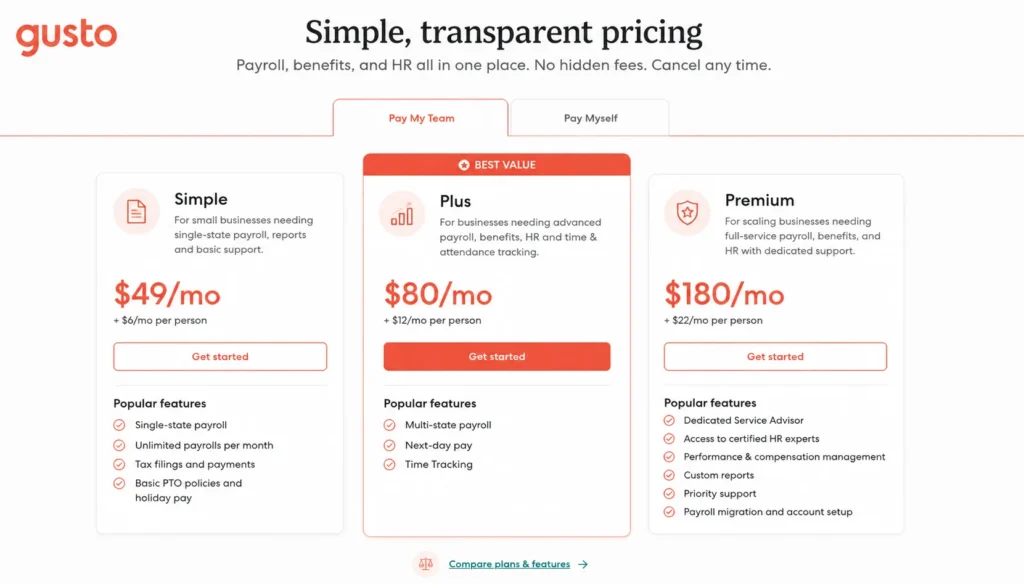
Gusto Pros and Cons
Before investing in Gusto, consider its main strengths and limitations.
Pros
- Combines payroll and several HR tasks in one platform.
- Automates eligible payroll tax filings and payments.
- Offers employee onboarding and self-service tools.
- Provides benefits administration through supported services.
- Includes unlimited payroll runs on advertised payroll plans.
- Offers additional HR support for growing businesses.
Cons
- Primarily designed for businesses operating in the United States.
- Monthly costs increase with employee count.
- Some HR and workforce features require higher-tier plans.
- Optional benefits and services can increase total expenses.
- Employers still need to review payroll information and maintain accurate records.
Overall, Gusto is most appealing to businesses that want payroll, tax administration, and employee management in one system rather than separate tools. Gusto’s official plan comparison
How to Get Started With Gusto
Getting started is straightforward when you know which payroll and HR tasks you want to simplify.
Step 1: Visit the official website. Go to Gusto’s official website and review the available plans.
Step 2: Choose a suitable plan. Compare payroll, HR, and workforce features to determine which subscription fits your business.
Step 3: Prepare your business information. Eligible US employers will generally need relevant business and tax details, along with employee information and pay rates.
Step 4: Set up employee records. Add the required information and configure pay schedules and supported deductions.
Step 5: Review payroll settings. Check tax details, payment arrangements, and relevant policies before processing payroll.
Step 6: Run and review payroll. Verify the calculations and employee details before approving payments.
Step 7: Explore additional tools. Once payroll is established, assess whether onboarding, time tracking, benefits, or other HR features would be useful.
Before committing, confirm plan eligibility and any available trial or introductory offer directly with Gusto.

Suggested image: The Gusto account setup page or a step-by-step visual showing payroll setup and employee onboarding.
Is Gusto Worth It in 2026?
Gusto is worth considering if your business operates in the United States and needs a practical way to manage payroll, payroll tax administration, and employee information.
Its main advantage is the ability to connect several recurring responsibilities within one platform. This can save administrative time, improve record organization, and make payroll easier to manage as a business grows.
However, it is not automatically the best choice for every company. Businesses with very limited payroll needs may prefer a simpler option, while companies outside the United States must verify local support before investing.
Our verdict: Gusto is a strong payroll and HR solution for eligible US small businesses that want to reduce manual administration and keep employee management organized. Compare the plans, calculate the total cost for your team, and confirm that the available services match your location and requirements before subscribing.
The best payroll software should do more than process payments. It should help you manage your workforce confidently, reduce repetitive tasks, and give you more time to focus on growing your business.
Leave a Reply