
ClickUp review 2026 is worth exploring if you want a better way to manage projects, organise tasks, collaborate with your team, and keep your work in one place. With deadlines, meetings, documents, and team conversations competing for attention, staying organised can become a challenge for businesses of every size.
ClickUp aims to solve this problem by bringing project management, task tracking, team collaboration, documentation, and artificial intelligence (AI) tools into one workspace. Instead of switching between several applications throughout the day, teams can organise much of their work from a central platform.
But is ClickUp easy to use, how much does it cost, and is it the right choice for your business in 2026? This review examines ClickUp’s features, pricing, AI capabilities, advantages, disadvantages, alternatives, and overall value to help you make an informed decision.
What Is ClickUp?
ClickUp is a cloud-based productivity and project management platform designed to help individuals and teams plan, organise, track, and complete their work.
It provides tools for creating tasks, assigning responsibilities, setting deadlines, sharing documents, communicating with colleagues, and monitoring project progress. Its flexible workspace structure allows businesses to organise work according to departments, teams, clients, projects, or individual workflows.
For example, a marketing agency could use ClickUp to manage content calendars, assign writing tasks, track design approvals, and monitor campaign deadlines. A software development team could use it to organise product backlogs, track bugs, and coordinate releases.
One of ClickUp’s main selling points is that it combines several productivity functions in one platform. Rather than relying on separate applications for task management, documentation, and project reporting, teams can bring many of these activities together.

What Does ClickUp Do?
ClickUp helps users manage work from the planning stage through to completion. Its tools support everyday activities as well as more complex project workflows.
Here are some of its main uses:
- Task management: Create tasks, assign team members, set priorities, and establish deadlines.
- Project management: Organise projects, monitor progress, and coordinate multiple activities.
- Team collaboration: Share updates, discuss tasks, and keep project-related communication organised.
- Document management: Create and share documents, notes, and internal knowledge resources.
- Time management: Use available time-tracking and workload tools to understand how work is progressing.
- Workflow automation: Automate selected repetitive tasks and notifications.
- Reporting: Use dashboards and reports to monitor performance and project status.
- AI-assisted productivity: Use ClickUp’s AI tools to assist with writing, summarising information, and completing selected work-related tasks.
These features make ClickUp useful for freelancers, startups, marketing agencies, remote teams, and established businesses that need a more structured approach to work.
The platform’s value becomes particularly clear when several people are working on the same project. Everyone can see their responsibilities, understand deadlines, and follow progress without relying entirely on scattered messages or spreadsheets.
How Does ClickUp Work?
ClickUp works through a structured workspace where users organise their projects and tasks.
At the top level, a Workspace represents the overall working environment. Within it, users can create Spaces for departments or major work categories, Folders for grouping related projects, and Lists for organising tasks.
Individual tasks can include descriptions, assignees, due dates, priorities, comments, attachments, and other relevant details. This structure makes it easier to break large projects into manageable steps.
ClickUp also offers different ways to view work. For example, List View presents tasks in a structured list, Board View displays work in columns, and Calendar View helps users understand upcoming deadlines. Gantt charts and Timeline views can support more advanced project planning, depending on feature availability and plan.
A team launching a website, for instance, could create separate task lists for content, design, development, testing, and launch preparation. Each team member would know what needs to be completed and when.
Once the workspace is configured, users can update tasks, communicate with colleagues, monitor progress, and use automation to reduce repetitive administrative work.
ClickUp Features in 2026
ClickUp offers a broad set of features, although availability and usage limits depend on the subscription plan.
1. Task and project management
Users can create tasks, assign responsibilities, establish deadlines, set priorities, and organise projects into manageable workflows. Custom statuses can also help teams track work from planning to completion.
2. Multiple project views
ClickUp provides different ways to visualise work, including List, Board, Calendar, and Gantt-style views. These options allow teams to choose the layout that best matches their working style.
3. Docs and knowledge management
ClickUp Docs enables teams to create project documentation, meeting notes, process guides, and internal resources within their workspace.
This helps reduce the need to search through separate applications for important information.
4. Dashboards and reporting
Dashboards help users monitor project progress, workloads, and selected performance indicators. Managers can use this information to identify delays and understand how work is progressing.
5. Automation
ClickUp supports workflow automation that can trigger actions when specific conditions are met. For example, a task’s status could trigger a notification or move work to another stage.
6. Integrations
ClickUp integrates with various third-party applications, helping teams connect their project workflows with other tools they already use. Available integrations and capabilities may vary.

ClickUp AI Features: What Can ClickUp AI Do?
ClickUp includes AI-powered capabilities designed to help teams reduce repetitive work and find information more quickly.
Depending on the plan and AI offering, ClickUp’s AI tools can assist with:
- Drafting and improving written content.
- Summarising documents, conversations, and task updates.
- Generating task descriptions and suggested action items.
- Helping users locate information within their workspace.
- Supporting meeting notes and the organisation of follow-up tasks.
- Assisting with selected workflow and project management activities.
ClickUp Brain is one of the platform’s AI offerings. ClickUp has also introduced broader AI capabilities, including tools and features that connect information across workflows.
For a marketing team, AI might help create a first draft of a campaign brief or summarise feedback from several project discussions. A project manager might use AI-generated summaries to understand recent updates without reviewing every comment individually.
However, AI-generated content should always be reviewed for accuracy, context, and quality. AI features may also require a separate paid add-on or be subject to usage limits, so businesses should check the current plan details before budgeting for them.
ClickUp Pricing and Plans in 2026
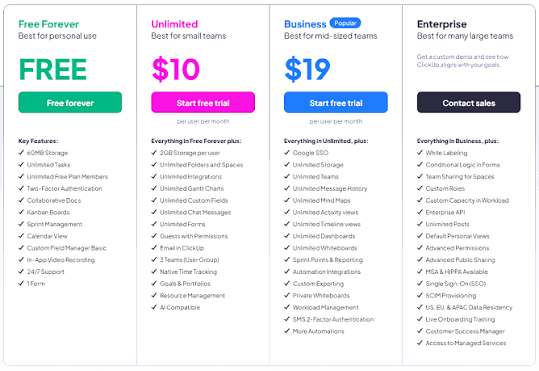
ClickUp offers multiple subscription plans for individuals, small teams, and larger organisations. Pricing can change, and the total cost depends on billing frequency, user count, selected features, and any additional AI services.
Its main plans include:
| Plan | Best suited for | General features |
|---|---|---|
| Free Forever | Individuals and small teams testing ClickUp | Basic task management and limited usage of selected features |
| Unlimited | Small teams | Expanded storage, integrations, and project management capabilities |
| Business | Growing teams | More advanced reporting, automation, and management features |
| Enterprise | Large organisations | Advanced administration, security, and custom requirements |
ClickUp’s paid plans have historically been advertised with starting prices of approximately $7 per user per month for Unlimited and $12 per user per month for Business when billed annually. These are reference prices, not guaranteed October 2026 quotes. Verify the current amounts, billing terms, and regional taxes on the official pricing page before purchasing.
AI features may incur additional charges depending on the offering and subscription.
For the latest prices and plan comparisons, visit the official ClickUp pricing page.
When comparing plans, think about what your team actually needs. A small business managing a few projects may not need advanced reporting or enterprise-level administration. Starting with a simpler plan can help you control costs while learning the platform.
ClickUp as Project Management Software
ClickUp is particularly useful for teams that need a central place to organise projects and coordinate responsibilities.
Traditional project management often involves a combination of spreadsheets, email threads, messaging applications, and separate document repositories. This can make it difficult to understand which tasks are complete, which are delayed, and who is responsible for the next step.
ClickUp helps address this problem by bringing tasks, deadlines, discussions, and documentation into a shared workspace.
A project manager can assign work, monitor progress, identify bottlenecks, and review deadlines without manually collecting updates from every team member.
Its flexibility is also an advantage. Marketing teams, product developers, consultants, and operations managers can configure workflows to match their needs.
However, ClickUp’s extensive features can take time to learn. Teams that introduce too many custom fields, statuses, automations, and dashboards at once may make their workspace more complicated than necessary.
The best approach is to start with a simple workflow and add complexity only when it solves a genuine problem.
Is ClickUp Good for Small Businesses?
Yes, ClickUp can be a strong option for small businesses, particularly those that need to coordinate several people or manage multiple projects at once.
Startups can use it to organise product development, track customer requests, and plan business operations. Marketing agencies can manage client campaigns, while freelancers can organise personal projects, deadlines, and deliverables.
The Free Forever plan also gives eligible users an opportunity to explore the platform before committing to a paid subscription.
Another advantage is flexibility. As a business grows, it can introduce additional features, refine workflows, and consider higher-tier plans when its requirements change.
However, small businesses should consider the learning curve. If your team only needs a simple to-do list, ClickUp may offer more functionality than you require. A simpler application could be easier to adopt.
Before rolling ClickUp out across your business, test it with a real project and ask team members whether it improves their day-to-day work.
ClickUp Pros and Cons
Understanding the advantages and limitations of ClickUp will help you decide whether it suits your working style.
Pros
- Broad functionality: Combines task management, project planning, documents, collaboration, and reporting.
- Flexible workflows: Supports different ways of organising tasks and projects.
- Multiple project views: Lets users choose layouts that suit their needs.
- AI-powered assistance: Helps with selected writing, summarisation, and information-retrieval tasks.
- Scalable plans: Offers options for individuals, small teams, and larger organisations.
- Integrations: Connects with various tools used in everyday business operations.
Cons
- Learning curve: The extensive feature set can feel overwhelming to new users.
- Feature restrictions: Some capabilities are limited to higher-tier plans or subject to usage limits.
- Potential extra AI costs: Certain AI capabilities may require additional payment.
- Setup requirements: Businesses may need time to configure their workspace effectively.
- Risk of overcomplication: Too many workflows and custom settings can make daily work harder to manage.
Overall, ClickUp offers considerable flexibility, but getting the most from it requires a thoughtful setup and consistent team adoption.
How to Get Started With ClickUp
Getting started with ClickUp is relatively straightforward, and you do not need to configure every feature on the first day.
Step 1: Create an account. Visit the official website and register for an account using the available signup options.
Step 2: Set up your Workspace. Create a Workspace and organise your Spaces around departments, clients, or major work categories.
Step 3: Add your first project. Create a project List, add tasks, assign responsibilities, and set realistic deadlines.
Step 4: Invite your team. Bring in colleagues who need access and explain how tasks should be updated.
Step 5: Choose your preferred views. Start with List or Board View and introduce other views when they add value.
Step 6: Explore automation and AI. Once your basic workflow is working well, test suitable automation and AI features.
You can sign up for ClickUp here and explore the available plans.
Start with one real project instead of moving every business process into ClickUp immediately. This gives your team time to learn the platform and helps you identify which features are genuinely useful.
ClickUp Alternatives
ClickUp is not the only project management platform worth considering. The best alternative depends on the size of your team, your budget, and how you prefer to organise work.
- Asana: A useful option for teams that want structured project tracking, task assignments, and workflow management.
- Trello: Suitable for individuals and teams who prefer straightforward Kanban-style boards.
- Monday.com: Offers visual work management tools for coordinating projects and business processes.
- Notion: Combines documentation, knowledge management, and flexible databases with project organisation features.
- Jira: Particularly relevant to software development teams that need issue tracking and development workflows.
Before switching platforms, compare pricing, collaboration features, integrations, automation, and ease of use. The best tool is the one your team can use consistently without creating unnecessary administrative work.
Is ClickUp Worth It in 2026? Final Verdict
ClickUp is worth considering in 2026 if you want a flexible platform for managing projects, organising tasks, collaborating with colleagues, and improving productivity.
Its combination of task management, project views, documentation, reporting, automation, and AI assistance makes it a compelling option for businesses that want to centralise their work.
The main trade-off is complexity. ClickUp can do a great deal, but teams need to invest some time in learning the platform and creating workflows that make sense for their daily operations.
For small businesses, startups, agencies, and growing teams, the Free Forever plan provides a practical starting point. Paid plans become more attractive when additional features deliver clear value.
Ready to organise your work more effectively? Visit ClickUp, explore its available plans, and test the platform with a real project. If it helps your team spend less time chasing updates and more time completing meaningful work, ClickUp could be a valuable addition to your business.
Leave a Reply