
ActiveCampaign used for email marketing, marketing automation, customer relationship management (CRM), and personalized customer communication. In 2026, it helps businesses connect with potential customers, nurture leads, automate repetitive marketing tasks, and build stronger customer relationships without managing every interaction manually.
But is ActiveCampaign worth paying for, especially for small businesses, startups, and growing online brands? This ActiveCampaign review explores its features, pricing and plans, advantages, limitations, and practical uses so you can decide whether it fits your business needs.
ActiveCampaign Review 2026: An Overview
ActiveCampaign is a marketing automation platform designed to help businesses coordinate email campaigns, customer data, sales activities, and communication workflows. Rather than relying on separate tools for every marketing task, users can manage many customer interactions from one platform.
Its main strength is automation. Businesses can create workflows that respond to customer actions, such as subscribing to a newsletter, clicking a link, purchasing a product, or showing interest in a service. These workflows help companies deliver relevant messages at the right time.
ActiveCampaign is particularly useful for businesses that want to move beyond sending occasional newsletters and build a more organized, personalized marketing strategy. However, its advanced features may require time to learn, and the cost can increase as contact lists and business requirements grow.

Suggested image: An ActiveCampaign dashboard showing email campaigns, contact management, and marketing automation.
What Is ActiveCampaign?
ActiveCampaign is a cloud-based email marketing and marketing automation platform with customer management and sales automation capabilities. It helps businesses collect customer information, organize contacts, communicate with audiences, and monitor interactions throughout the customer journey.
For example, an online store can use ActiveCampaign to welcome new subscribers, recommend products, follow up after purchases, and encourage customers to return. A consulting business can use it to collect leads, send educational emails, schedule follow-ups, and manage potential sales opportunities.
The platform also integrates with other business applications, helping users connect marketing activities with ecommerce, website forms, and other tools they already use. The exact features available depend on the selected plan and any additional services purchased.
What Does ActiveCampaign Do?
ActiveCampaign helps businesses attract leads, communicate with prospects, and maintain relationships with existing customers. Its main uses include:
- Email marketing: Create newsletters, promotional campaigns, product announcements, and customer updates.
- Marketing automation: Send messages and perform actions automatically when contacts meet specific conditions.
- Contact management: Organize subscribers and customers using tags, lists, and audience segments.
- Sales management: Track leads and opportunities through a sales pipeline using available CRM features.
- Customer retention: Send follow-up messages, educational content, and relevant offers to encourage repeat business.
- Campaign analysis: Monitor campaign performance and use available reporting tools to improve future results.
Consider a small business that receives dozens of enquiries each week. Instead of manually emailing every prospect, the business can create an automated sequence that introduces its services, shares useful information, and encourages interested prospects to book a consultation.
That is where ActiveCampaign can make a practical difference: it helps businesses maintain consistent communication while freeing up time for other priorities.
How Does ActiveCampaign Work?
ActiveCampaign works by combining contact information, customer activity, communication channels, and automated workflows.
The process typically begins when someone subscribes through a website form, joins a mailing list, or enters the system through an integration. The business can then organize that contact according to interests, behaviour, purchase history, or other relevant information.
Next, the user creates an email campaign or automation. An automation might begin when someone subscribes, visit a particular page, clicks a link, or completes another supported action. Based on the workflow’s conditions, ActiveCampaign can send messages, update contact information, apply tags, or trigger other actions.
For instance, a software company might automatically send a welcome email to new subscribers, follow up with a product guide two days later, and share a trial invitation with contacts who demonstrate interest.
Finally, reporting tools help the business assess engagement and identify opportunities to improve its campaigns. The best results come from using accurate contact data, relevant content, and clear goals rather than automating communication simply for the sake of it.
ActiveCampaign Features
ActiveCampaign offers several features that support email marketing, automation, and customer management.
1. Email Campaign Builder
Users can create marketing emails using a visual editor, design templates, and personalization options. This makes it easier to produce newsletters and promotional campaigns without building every email from scratch.
2. Marketing Automation Builder
The automation builder allows users to design workflows using triggers, actions, and conditional steps. Businesses can automate welcome sequences, lead nurturing, follow-ups, and other recurring processes.
3. Contact Segmentation
Segmentation helps businesses divide audiences into relevant groups. For example, an online store could separate first-time buyers from repeat customers and send each group more appropriate offers.
4. CRM and Sales Pipelines
Available CRM capabilities help businesses organize sales opportunities, track deals, and manage prospect interactions. Some enhanced CRM functions require an eligible plan or paid add-on.
5. Landing Pages and Signup Forms
Depending on the plan, users can create landing pages and forms to collect contact details and grow their subscriber lists.
6. Reporting and Analytics
Campaign reporting helps users evaluate engagement and identify which messages perform well. More advanced reporting, attribution, and optimization capabilities vary by plan.
7. Integrations and AI Tools
ActiveCampaign connects with supported ecommerce platforms and other business applications. It also offers AI-powered capabilities to assist with campaign creation and automation, although availability and functionality can vary.
These features make ActiveCampaign more than a basic email sender. Its greatest value comes from connecting them into a coherent customer journey 
Suggested image: An email automation workflow showing triggers, follow-up emails, and customer segments.
ActiveCampaign Pricing and Plans in 2026
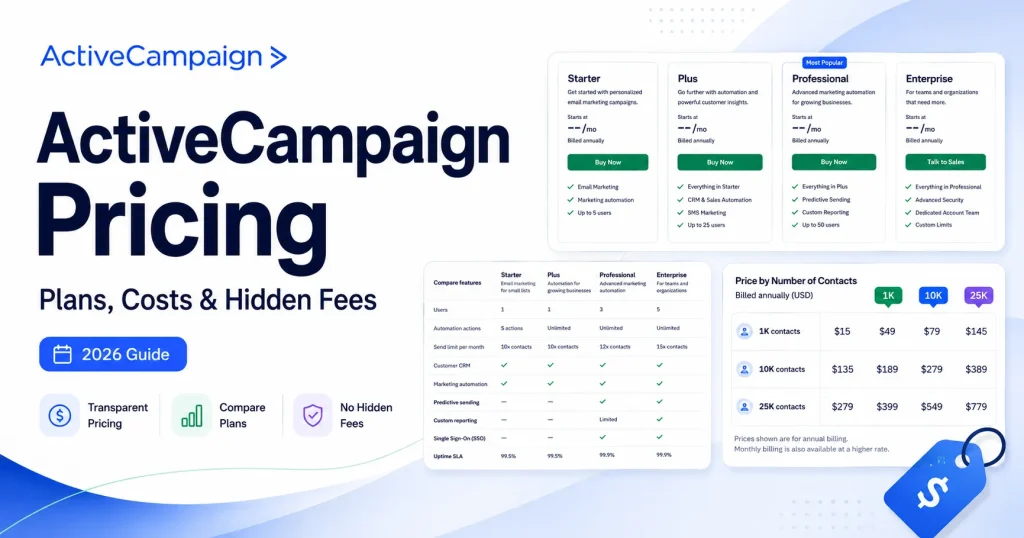
ActiveCampaign uses a tiered pricing model. Its advertised cost can depend on factors such as the plan, contact volume, billing arrangement, and selected add-ons. Therefore, there is no single price that accurately represents what every business will pay.
The main email plan levels include:
| Plan | Best For | General Capabilities |
|---|---|---|
| Starter | Individuals and businesses beginning with automation | Core email marketing, contact organization, integrations, and lighter automation |
| Plus | Growing businesses needing more flexibility | More advanced automation options, segmentation, landing pages, and additional marketing capabilities |
| Professional | Businesses with more complex customer journeys | Advanced automation, reporting, testing, and optimization features |
| Enterprise | Larger teams with advanced requirements | Higher-level support, permissions, reporting, and enterprise-oriented capabilities |
The exact feature limits and included user seats differ by plan. SMS messaging, transactional email, custom reporting, and enhanced CRM features may require additional purchases or specific subscriptions.
How can you check the latest price? Visit the official ActiveCampaign pricing page and enter your business requirements to review the available options.
Before subscribing, calculate the likely cost based on your current contact list and expected growth. A plan that seems affordable for a small audience may become more expensive as your database expands. Also, compare the features you genuinely need instead of paying for advanced tools you may rarely use.
ActiveCampaign offers a 14-day free trial, subject to its current trial limits and terms. This gives prospective users an opportunity to explore the platform before committing to a paid subscription.
ActiveCampaign Email Marketing
Email marketing is one of ActiveCampaign’s central capabilities. Businesses can use it to send newsletters, announce new products, promote offers, share educational content, and keep customers informed.
The platform supports personalized campaigns, audience segmentation, and testing features on eligible plans. Instead of sending the same message to everyone, marketers can tailor content to a subscriber’s interests or stage in the buying process.
For example, a digital course provider could send introductory lessons to new subscribers and offer an enrolment discount to people who have shown interest but have not purchased.
However, successful email marketing still depends on good writing, relevant offers, permission-based contact lists, and consistent testing. The software can help deliver your message, but it cannot automatically make an unappealing offer attractive.
ActiveCampaign Marketing Automation
Marketing automation is one of ActiveCampaign’s biggest selling points. It allows businesses to build repeatable workflows that respond to customer behaviour without requiring constant manual intervention.
Common examples include:
- Sending welcome emails after a new subscription.
- Following up with leads who request information.
- Reminding customers about incomplete purchases through supported integrations.
- Delivering onboarding messages after a purchase.
- Sending relevant follow-up content based on contact activity.
Automation can save time and help businesses communicate more consistently. It can also reduce the likelihood of leads being forgotten when a team is busy.
Still, automation requires thoughtful setup. Poorly designed workflows can send irrelevant messages, create confusing customer experiences, or continue promoting products after someone has already purchased them. Review your workflows regularly and test them before making them live.
Suggested image: A marketing automation diagram illustrating a welcome sequence followed by personalized customer emails.
ActiveCampaign CRM
ActiveCampaign includes CRM capabilities designed to help businesses coordinate marketing and sales activities. Users can organize contacts, manage opportunities, and track prospects as they move through a sales pipeline.
This is particularly helpful when marketing generates leads but sales staff need a clear process for following up. For example, a consulting firm can capture an enquiry, assign the prospect to a sales stage, and coordinate subsequent communication.
However, businesses should review the specific CRM features included in their chosen subscription. Certain enhanced pipeline and sales engagement capabilities are offered as add-ons, so the basic subscription may not include every sales function a company expects.
ActiveCampaign for Small Businesses
ActiveCampaign can be a strong option for small businesses that depend on repeat communication, lead nurturing, and customer retention. Consultants, online educators, ecommerce stores, marketing agencies, and service providers may benefit from its combination of email marketing and automation.
A small business could use it to collect leads, send a welcome series, follow up with prospects, and maintain relationships with existing customers without manually managing every step.
The important question is whether the platform matches your current needs. If you only send an occasional newsletter to a small audience, a simpler and less expensive email tool may be sufficient. If your business needs personalized campaigns, complex workflows, and connected sales processes, ActiveCampaign may offer more value.
Start with the processes that consume the most time, then expand your use of the platform as your marketing becomes more sophisticated.
ActiveCampaign Pros and Cons
Before making a decision, consider the platform’s main advantages and limitations.
Pros
- Powerful marketing automation and customer journey workflows.
- Email marketing and contact segmentation in one platform.
- CRM capabilities that can connect marketing with sales.
- Integrations with supported business and ecommerce tools.
- Personalization and reporting features to improve campaign relevance.
Cons
- The range of features can take time to learn.
- Costs can increase with contact volume and additional requirements.
- Some CRM and reporting capabilities may require higher plans or add-ons.
- Smaller businesses may not need all its advanced functionality.
- Results still depend on effective strategy, good content, and clean contact data.
Overall, ActiveCampaign is most attractive when a business will use its automation capabilities regularly. Businesses that need only basic email delivery should compare simpler alternatives before committing.
How to Get Started With ActiveCampaign
Getting started is straightforward if you have a clear goal for your first campaign.
Step 1: Create an account. Visit the official ActiveCampaign signup page to explore the free trial and available plans.
Step 2: Define your marketing goal. Decide whether you want to grow your email list, nurture leads, improve customer retention, or support sales follow-ups.
Step 3: Import or collect contacts. Organize your subscriber information and ensure you have the appropriate permission to send marketing messages.
Step 4: Build your first campaign. Start with a useful newsletter or a simple welcome email sequence instead of attempting to automate every business process immediately.
Step 5: Create a basic automation. Choose a relevant trigger, write the messages, and check the workflow carefully before activating it.
Step 6: Monitor results. Review available reporting, test improvements, and adjust your approach based on how subscribers respond.
Starting small gives you time to understand the platform and build a system you can confidently expand. 
Suggested image: The ActiveCampaign signup page or a step-by-step visual showing account setup and the first email campaign.
Is ActiveCampaign Worth It in 2026?
ActiveCampaign is worth considering if your business needs more than basic email marketing. Its combination of automation, segmentation, customer communication, integrations, and CRM capabilities can help businesses build more consistent customer journeys and reduce repetitive work.
It may be especially valuable for companies with growing subscriber lists, multiple customer segments, ongoing lead nurturing, or sales processes that benefit from automation.
On the other hand, it may be unnecessary for businesses that send occasional emails and have little need for complex workflows. Pricing, learning time, and feature requirements should all factor into your decision.
Our verdict: ActiveCampaign is a compelling option for businesses ready to invest in structured, personalized marketing. Take advantage of the trial, test a real workflow, and compare the features and total cost against your business goals before choosing a plan.
The best marketing platform is not necessarily the one with the most features. It is the one your team can use consistently to attract customers, build trust, and generate measurable results.
Leave a Reply